Off Topic
    • Categories
    • Tags
    • Users
    • Groups
    • Amazon
    • OT Fundraiser
    • Register
    • Login

    The OFFICIAL programming thread

    Tech
    22
    1.4k
    10.5k
    Loading More Posts
    • Oldest to Newest
    • Newest to Oldest
    • Most Votes
    Reply
    • Reply as topic
    Log in to reply
    This topic has been deleted. Only users with topic management privileges can see it.
    • ?
      A Former User
      last edited by

      https://twitter.com/shashj/status/1636101746714894337?s=20
      1 Reply Last reply Reply Quote 1
      • Gators1G
        Gators1
        last edited by

        @Lob12 's gotta get paid…

        Peter Kafka  /  Feb 1, 2023  /  technology

        The AI boom is here, and so are the lawsuits

        The AI boom is here, and so are the lawsuits

        What can Napster tell us about the future?

        alt text

        1 Reply Last reply Reply Quote 0
        • Gators1G
          Gators1
          last edited by

          M$ is all in on AI. Already integrated in Office 365 and for once they came up with something useful.

          Introducing Microsoft 365 Copilot with Outlook, PowerPoint, Excel, and OneNote

          alt text

          1 Reply Last reply Reply Quote 0
          • ?
            A Former User
            last edited by

            I could see myself using this to create whole cities one day:

            Reddit: GPT-4 to Blender

            Gators1G 1 Reply Last reply Reply Quote 0
            • Gators1G
              Gators1 @A Former User
              last edited by

              @Hog said in The OFFICIAL programming thread:

              I could see myself using this to create whole cities one day:

              Reddit: GPT-4 to Blender

              Someone is gonna be pissed if you create a whole medival village complete with peasants with all their body parts in 5 minutes.

              alt text

              KilemallK 1 Reply Last reply Reply Quote 2
              • KilemallK
                Kilemall Careful, railroad agent @Gators1
                last edited by

                @Gators1 said in The OFFICIAL programming thread:

                @Hog said in The OFFICIAL programming thread:

                I could see myself using this to create whole cities one day:

                Reddit: GPT-4 to Blender

                Someone is gonna be pissed if you create a whole medival village complete with peasants with all their body parts in 5 minutes.

                Finnish modeling cobblers thrown out of work by globalist AI!

                https://i.imgur.com/hX2CMMZ.jpg

                Never go full Lithu-
                Twain

                No editing is gonna save you now-
                Wingmann

                http://s3.amazonaws.com/rrpa_photos/72217/DSC_2528.JPG

                http://s3.amazonaws.com/rrpa_photos/20416/PTOB 101_resize.jpg

                1 Reply Last reply Reply Quote 0
                • TazzT
                  Tazz
                  last edited by

                  image.png

                  GTFO

                  1 Reply Last reply Reply Quote 2
                  • Gators1G
                    Gators1
                    last edited by

                    Apr 4, 2023  /  ChatGPT

                    Samsung workers made a major error by using ChatGPT

                    Samsung workers made a major error by using ChatGPT

                    Samsung meeting notes and new source code are now in the wild after being leaked in ChatGPT

                    alt text

                    ? 1 Reply Last reply Reply Quote 2
                    • ?
                      A Former User @Gators1
                      last edited by

                      @Gators1 said in The OFFICIAL programming thread:

                      Samsung meeting notes and new source code are now in the wild

                      Interesting enough article without the lying, clickbait intro text.

                      I guess the fuckers got me to read it.

                      1 Reply Last reply Reply Quote 0
                      • ?
                        A Former User
                        last edited by

                        Nerds, to me!

                        I have an Excel line chart plotted, but want to add a static line to it. By static I mean the value is the same across all 12 months, so its just a straight horizontal line. If I do x-y with y being the value, and x being the dates, it doest draw a line, it just plots the one value at the first date. Now this is because I dont have the corresponding table built with that static number running across all the date value, its just too much work

                        I think i’'ve done this before years ago, but I also used Sigma Plot back then so maybe not.

                        Dis blue line

                        image.png

                        ? O 2 Replies Last reply Reply Quote 0
                        • ?
                          A Former User @A Former User
                          last edited by

                          @Zeppelin said in The OFFICIAL programming thread:

                          I dont have the corresponding table built with that static number running across all the date value

                          Can’t you just use the same table where the variable data is coming from and insert a column? Enter the static value and let Excel auto fill it out down the entire range.

                          ? 1 Reply Last reply Reply Quote 1
                          • ?
                            A Former User @A Former User
                            last edited by

                            @Hog said in The OFFICIAL programming thread:

                            @Zeppelin said in The OFFICIAL programming thread:

                            I dont have the corresponding table built with that static number running across all the date value

                            Can’t you just use the same table where the variable data is coming from and insert a column? Enter the static value and let Excel auto fill it out down the entire range.

                            It is what I did, but the y value just says 65.5. It would need to say that 12 times, I think. As a range of values.

                            I feel there is a switch to put in there next to the 65.5

                            1 Reply Last reply Reply Quote -1
                            • Gators1G
                              Gators1
                              last edited by

                              What Hog said. You need to add a value of 65.5 for every value of X in your data source.

                              How to add a line in Excel graph: average line, benchmark, etc.
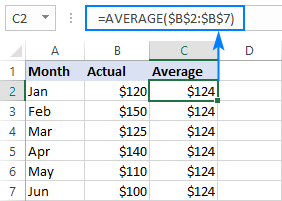
                              How to add a line in Excel graph: average line, benchmark, etc.

                              See how to add a horizontal a line in Excel chart such as an average line, baseline, benchmark, trend line, etc.

                              alt text

                              1 Reply Last reply Reply Quote 0
                              • ?
                                A Former User
                                last edited by

                                ffs

                                1 Reply Last reply Reply Quote -1
                                • TazzT
                                  Tazz
                                  last edited by

                                  Use Microsoft Paint

                                  GTFO

                                  rote7R ? 2 Replies Last reply Reply Quote 2
                                  • rote7R
                                    rote7 @Tazz
                                    last edited by

                                    @Tazz said in The OFFICIAL programming thread:

                                    Use Microsoft Paint

                                    Damn, you beat me to it.

                                    fffg

                                    1 Reply Last reply Reply Quote 2
                                    • ?
                                      A Former User @Tazz
                                      last edited by

                                      @Tazz said in The OFFICIAL programming thread:

                                      Use Microsoft Paint

                                      Or a sharpie

                                      I mean…

                                      1 Reply Last reply Reply Quote 0
                                      • Gators1G
                                        Gators1
                                        last edited by

                                        He’s got a point. you already drew the lines so it’s probably faster to just write in the numbers than google “Excel for Dummies” and read through that.

                                        alt text

                                        ? 1 Reply Last reply Reply Quote 0
                                        • ?
                                          A Former User @Gators1
                                          last edited by

                                          @Gators1 said in The OFFICIAL programming thread:

                                          He’s got a point. you already drew the lines so it’s probably faster to just write in the numbers than google “Excel for Dummies” and read through that.

                                          I am a professional and that is Bush league.

                                          Bush league!!

                                          1 Reply Last reply Reply Quote 0
                                          • Gators1G
                                            Gators1
                                            last edited by

                                            I thought you worked for the government? I have seen worse charts come from the government.

                                            alt text

                                            ? 1 Reply Last reply Reply Quote 0
                                            • First post
                                              Last post